
 ES
ES EN
ENHow to automate your Conversations with AI Agents
Power up your customer support with AI Agents. Hand off your Conversations to Artificial Intelligence that understands and replies to your Contacts naturally and automatically, 24 hours a day.
What is an AI Agent?
An AI Agent is a smart virtual assistant that manages the incoming Conversations in your Doppler account. Unlike traditional auto-replies, it understands the context of each message and responds naturally, like a real member of your team.
Set it up once with your business’s personality and knowledge, and let it work for you.
AI Agent vs. Conversation Flows: which one should you choose?
Each Room can have only one type of automation active: an AI Agent or a Conversation Flow. You can’t run both at the same time.
| AI Agent | Conversation Flows | |
| How it responds | Natural language processing: understands the context and generates dynamic replies | Predefined decision tree: follows a path of options you set up |
| Best for | Open-ended questions, support, conversational sales | Structured processes, option menus, fixed flows |
| Flexibility | High: responds to questions you didn’t anticipate | Limited: only responds within the configured tree |
When should you use an AI Agent? When you need AI to understand free-form questions and respond with judgment, without making the customer pick options from a menu.
How to activate your AI Agent: step by step
1- Go to the AI Agents section
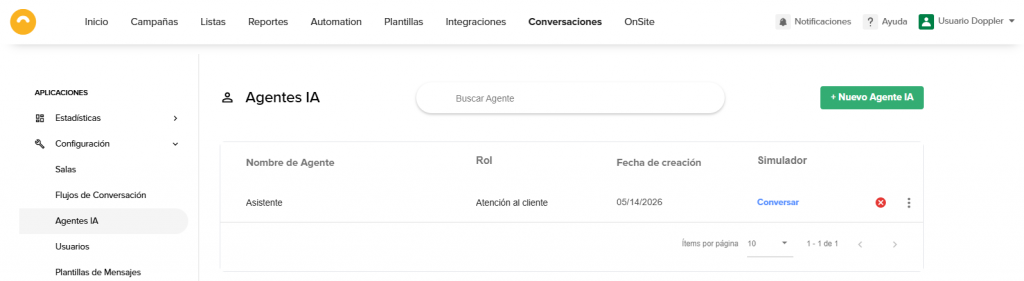
From Doppler’s main menu, go to Conversations → Settings → AI Agents.
Here you can create new agents, find all the ones in your account, and test them with the simulator available from the list.
2- Create your new Agent
Click the + New AI Agent button (top right corner).
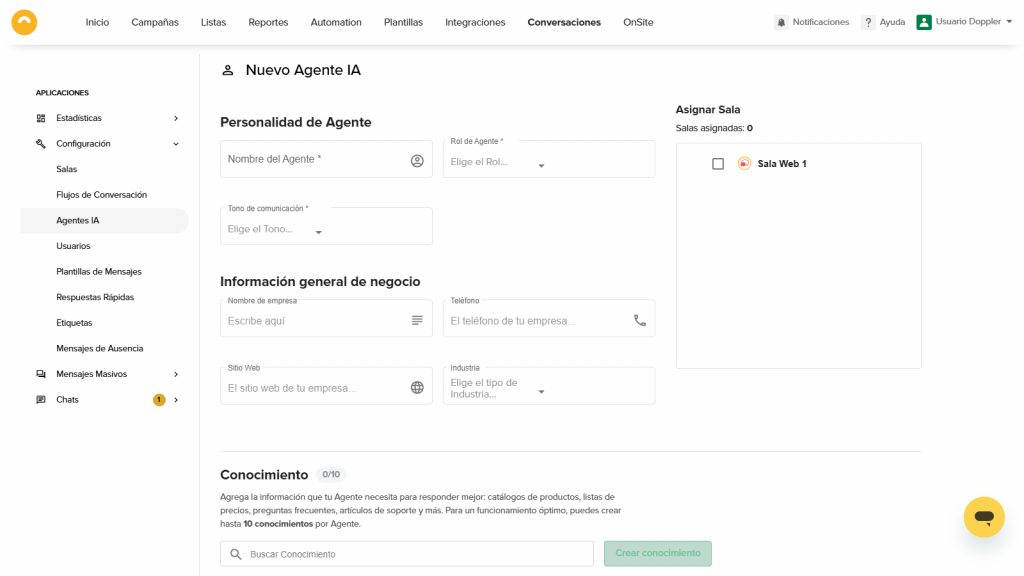
The configuration form opens with three main sections: Agent Personality, General business information, and Knowledge.
3- Define the Personality and the Knowledge
This is the most important part: here you teach the Agent how to behave and what information it needs to use to respond.
General business information
Fill in your company name, website, phone, and industry. This information gives context to the Agent’s responses.
Agent Personality
- Agent name: The name it uses to introduce itself to your Contacts.
- Role: Defines its function (Salesperson, Support, Customer Service, etc.).
- Communication tone: Choose the style that best represents your brand.
Knowledge
Here you load the information the Agent will use to respond, for example:
- Product catalogs
- Price lists
- Frequently asked questions
- Support articles
Click Create knowledge, write a title and its content, and save. Add as many knowledges as you need.
4- Link the Agent to a Room
In the right panel of the form, you’ll see the Assign Room section.
Select the Room you want to link this Agent to. Remember that each Room can only have one AI Agent or one Conversation Flow active, not both.
Click Save and your Agent is ready to respond.
The role of the Human Agent: the AI that knows when to step aside
Human intervention always takes priority over the AI Agent.
If a member of your team (Human Agent) manually sends a message within a Conversation, the AI pauses automatically so it doesn’t interfere with the direct exchange with the customer. This makes sure the Contact’s experience is never affected by simultaneous or contradictory replies.
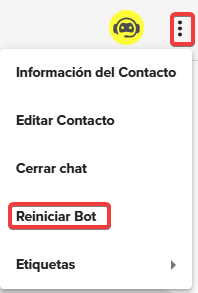
Once you’ve answered the query, you can turn the bot back on from here:
Important notes
- This feature is available starting with the 500-message plan.
- The AI Agent only supports text responses. It doesn’t send images, files, or multimedia content.
- The Agent sends a single reply for each message it receives from the customer (1×1 model).
- You can test the Agent’s behavior before activating it using the Simulator from the AI Agents list.
You now have everything you need to automate your support with Artificial Intelligence! Set up your first AI Agent and free up time so your team can focus on what really matters.
Have questions? Contact us on WhatsApp or by email at [email protected].
We’re here to help 💛

 Loading...
Doppler informs you that the personal data that you provide to us when completing this form will be treated by Doppler LLC as responsible for this web.
Purpose: To allow you to make comments in our help center.
Legitimation: Consent of the applicant.
Recipients: Your data will be saved by Doppler and Digital Ocean as hosting company.
Additional information: In the Doppler Privacy Policy you’ll find additional information about the collection and use of your personal information by Doppler, including information on access, conservation, rectification, deletion, security, cross-border data transfers and other issues.