
 ES
ES EN
ENWhere can I find my invoices?
In this article, you’ll learn where to find the service invoices for your current plan. This information will help you view and download them whenever you need it. Let’s see how to do it ☺️
Step by step to find your invoices
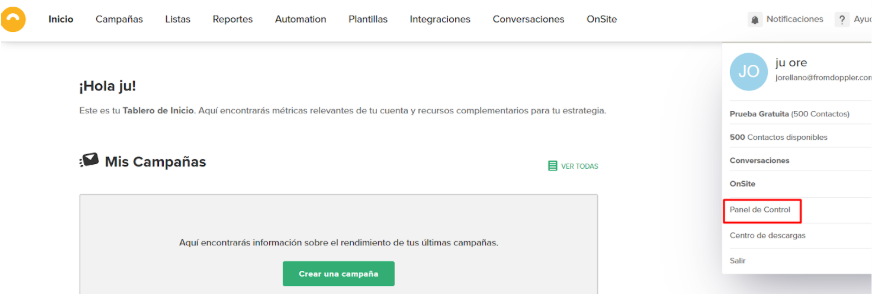
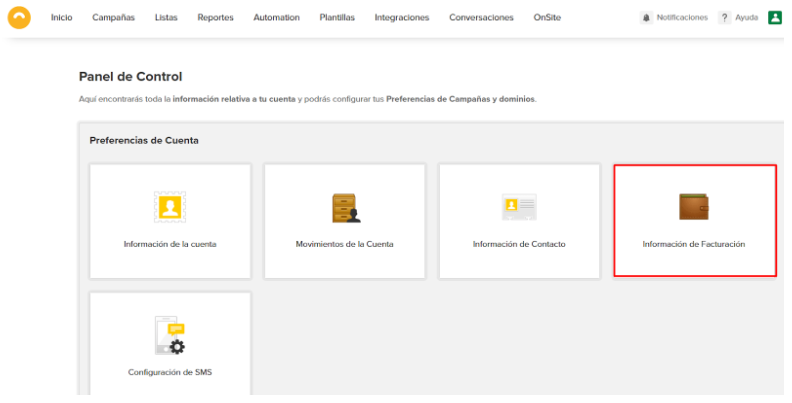
1. First, log in to your account and go to the Control Panel in the top right corner of the Dashboard. Once there, click on the Billing Information option.
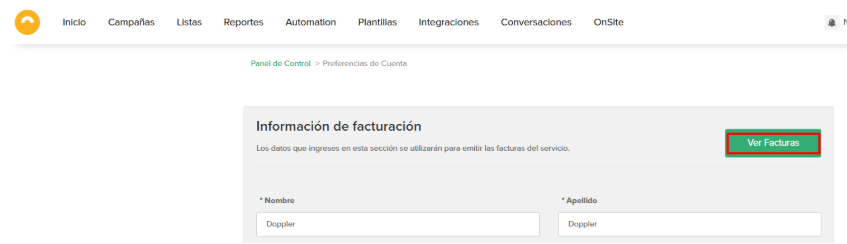
2 – Once here, click on the green button that says View Invoices.
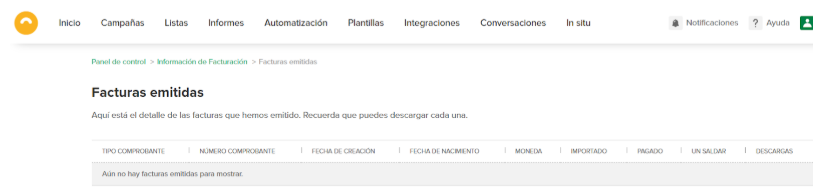
3- Here you will find all the service invoices with useful information such as amount, due date, payment status, and even a button to download these documents and have them whenever you need them.
If you have any questions or comments, please contact our Support team through our support channels. By email at [email protected], WhatsApp, and online chat, or through our social media.
We’re here to help. 💛

 Loading...
Doppler informs you that the personal data that you provide to us when completing this form will be treated by Doppler LLC as responsible for this web.
Purpose: To allow you to make comments in our help center.
Legitimation: Consent of the applicant.
Recipients: Your data will be saved by Doppler and Digital Ocean as hosting company.
Additional information: In the Doppler Privacy Policy you’ll find additional information about the collection and use of your personal information by Doppler, including information on access, conservation, rectification, deletion, security, cross-border data transfers and other issues.